The program is intended for installation key and activate Windows 7-10 and Office 2010-2016. If the set key enables activation over the network, via the Internet, the product is activated automatically, if this does not happen and the key is not blocked – the code is issued to transfer M$ Activation Center to activate by phone. Unlike MSAct in the program MSAct Plus has the ability to create groups of keys for different products.
Work with the program:
Select a product to install key and activation;
Type in the input box key the key for the selected product;
Click “Set key”.
If the set key enables activation over the network, via the Internet, the product is activated automatically, otherwise, if the key is not blocked, in boxes 1-9 display the code for sending the Activation Center M$ to activate by phone. To activate by phone, you must call the Activation Center, send the code of the fields “1-9? and to get the return code that must be entered in the field “A-H” and click “Apply”. If everything is completed without errors, the product is activated. When activation is completed, you can save the key and the return code into a text file using special button. Subsequently, for example, after reinstalling the system, rather will set key to enter the program previously stored return code and click “Apply”. Recovery activation is possible even if the key is already blocked.
*** If you copy to the clipboard saved response code and set the cursor to the fileld “A”, the code will be inserted automatically.
*** A button near the block “9? forcibly displays the code for transmitting to the Center Activation, even if the key is blocked. This enables you to activate by phone, for keys held online activation.
Working with Database Keys
In the window Database Keys you can create your own group of keys, delete, add to group keys from the clipboard share, load groups in the field for entering the key. After loading the group is available automatic program mode. In this mode, all keys are processed by turns, until the product will be activated or end a list of keys.
_________________________________________________
Größe: 2 MB
Sprache: Multi/Deutsch
Format: Exe
Plattform: Microsoft Windows 7/8/8.1/10 (32 oder 64-Bit)
Hoster: Uploaded, Share-Online, RapidGator, FileFactory
________________________________________
Das Programm ist für Installationsschlüssel und Aktivierung von Windows 7-10 und Office 2010-2019 vorgesehen. Wenn der eingestellte Schlüssel die Aktivierung über das Netzwerk ermöglicht, über das Internet, wird das Produkt automatisch aktiviert, wenn dies nicht geschieht und der Schlüssel nicht gesperrt ist - der Code wird ausgegeben, um das M$ Activation Center zur telefonischen Aktivierung zu übertragen.
Im Gegensatz zu MSAct im Programm hat MSAct Plus die Möglichkeit, Schlüsselgruppen für verschiedene Produkte zu erstellen.
Mit dem Programm arbeiten
1. Wählen Sie ein Produkt aus, um den Schlüssel und die Aktivierung zu installieren;
2. Geben Sie in das Eingabefeld key den Schlüssel für das ausgewählte Produkt ein;
3. Klicken Sie auf "Schlüssel setzen".
Wenn der eingestellte Schlüssel die Aktivierung über das Netzwerk ermöglicht, über das Internet, wird das Produkt automatisch aktiviert, andernfalls, wenn der Schlüssel nicht gesperrt ist, zeigen Sie in den Feldern 1-9 den Code zum Senden des Aktivierungszentrums M$ zur telefonischen Aktivierung an. Um per Telefon zu aktivieren, müssen Sie das Activation Center anrufen, den Code der Felder "1-9" senden und den Returncode erhalten, der in das Feld "A-H" eingetragen werden muss und auf "Übernehmen" klicken. Wenn alles ohne Fehler abgeschlossen ist, wird das Produkt aktiviert. Wenn die Aktivierung abgeschlossen ist, können Sie den Schlüssel und den Rückgabecode über eine spezielle Schaltfläche in einer Textdatei speichern. Anschließend, zum Beispiel nach einer Neuinstallation des Systems, wird eher der Schlüssel gesetzt, um den zuvor gespeicherten Rückkehrcode des Programms einzugeben und auf "Übernehmen" zu klicken. Die Wiederherstellungsaktivierung ist auch dann möglich, wenn der Schlüssel bereits gesperrt ist.
*** Wenn Sie den gespeicherten Antwortcode in die Zwischenablage kopieren und den Cursor auf das Feld "A" setzen, wird der Code automatisch eingefügt.
*** Eine Schaltfläche in der Nähe des Blocks "9" zeigt zwangsweise den Code zur Übertragung an die Zentrale Aktivierung an, auch wenn der Schlüssel gesperrt ist. Dies ermöglicht Ihnen eine telefonische Aktivierung, für gehaltene Schlüssel eine Online-Aktivierung.
Arbeiten mit Datenbankschlüsseln
Im Fenster Datenbankschlüssel können Sie Ihre eigene Schlüsselgruppe erstellen, löschen, zu Gruppenschlüsseln aus der Zwischenablage hinzufügen, Gruppen in das Feld zur Schlüsseleingabe laden. Nach dem Laden der Gruppe steht der automatische Programmmodus zur Verfügung. In diesem Modus werden alle Schlüssel abwechselnd bearbeitet, bis das Produkt aktiviert wird oder eine Schlüsselliste beendet wird.
Was gibt's Neues
- Unterstützung von Office 2021-Schlüsseln.
Sprache: Deutsch, Multi | Größe: 2.64 MB | Format: RAR, EXE | Plattform: Windows 7, 8/8.1, 10, 11 (32/64Bit)
The program is intended for installation key and activate Windows 7-10 and Office 2010-2019. If the set key enables activation over the network, via the Internet, the product is activated automatically, if this does not happen and the key is not blocked - the code is issued to transfer M$ Activation Center to activate by phone. Unlike MSAct in the program MSAct Plus has the ability to create groups of keys for different products.
Work with the program
1. Select a product to install key and activation;
2. Type in the input box key the key for the selected product;
3. Click "Set key".
If the set key enables activation over the network, via the Internet, the product is activated automatically, otherwise, if the key is not blocked, in boxes 1-9 display the code for sending the Activation Center M$ to activate by phone. To activate by phone, you must call the Activation Center, send the code of the fields "1-9" and to get the return code that must be entered in the field "A-H" and click "Apply". If everything is completed without errors, the product is activated. When activation is completed, you can save the key and the return code into a text file using special button. Subsequently, for example, after reinstalling the system, rather will set key to enter the program previously stored return code and click "Apply". Recovery activation is possible even if the key is already blocked.
*** If you copy to the clipboard saved response code and set the cursor to the fileld "A", the code will be inserted automatically.
*** A button near the block "9" forcibly displays the code for transmitting to the Center Activation, even if the key is blocked. This enables you to activate by phone, for keys held online activation.
Working with Database Keys
In the window Database Keys you can create your own group of keys, delete, add to group keys from the clipboard share, load groups in the field for entering the key. After loading the group is available automatic program mode. In this mode, all keys are processed by turns, until the product will be activated or end a list of keys.
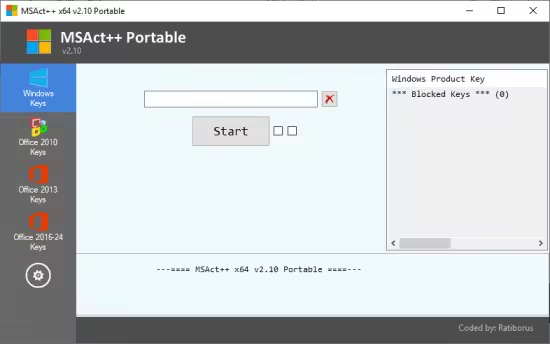
The program is intended for installation key and activate Windows and Office. If the set key enables activation over the network, via the Internet, the product is activated automatically, if this does not happen and the key is not blocked - the code is issued to transfer M$ Activation Center to activate by phone.
Work with the program
1. Select a product to install key and activation;
2. Type in the input box key the key for the selected product;
3. Click "Start".
If the set key enables activation over the network, via the Internet, the product is activated automatically, otherwise, if the key is not blocked, will shows the activation window by phone. To activate by phone, you must call the Activation Center, send the code of the fields "1-9" and to get the return code that must be entered in the field "A-H" and click "Apply Code". If everything is completed without errors, the product is activated.
*** If you copy to the clipboard saved response code and holding the Ctrl key set the cursor to the fileld "A", the code will be inserted automatically.
*** If you hold Ctrl while typing a key in the key entry field, the key is installed and the forced creation *** Activation Backup ***.
Whats New
- The group of incorrect keys has been updated with keys containing errors '0xC004E016', '0xC004E017', '0xC004E018'.
Das Programm dient der Installation und Aktivierung von Windows 7–11 und Office 2010–2021. Wenn der festgelegte Schlüssel die Aktivierung über das Netzwerk (Internet) ermöglicht, wird das Produkt automatisch aktiviert. Andernfalls, falls der Schlüssel nicht gesperrt ist, wird ein Code an das Microsoft-Aktivierungscenter gesendet, um die Aktivierung telefonisch durchzuführen. Im Gegensatz zu MSAct bietet MSAct Plus die Möglichkeit, Schlüsselgruppen für verschiedene Produkte anzulegen.
So verwenden Sie das Programm:
1. Wählen Sie ein Produkt aus, für das Sie den Schlüssel und die Aktivierung festlegen möchten.
2. Geben Sie den Schlüssel für das ausgewählte Produkt in das Eingabefeld ein.
3. Klicken Sie auf „Schlüssel festlegen“.
Wenn der festgelegte Schlüssel die Aktivierung über das Netzwerk (Internet) ermöglicht, wird das Produkt automatisch aktiviert. Andernfalls, falls der Schlüssel nicht gesperrt ist, wird in den Feldern 1–9 der Code angezeigt, der an das Microsoft-Aktivierungscenter gesendet werden muss, um die Aktivierung telefonisch durchzuführen. Zur telefonischen Aktivierung rufen Sie das Aktivierungszentrum an, geben Sie den Code in den Feldern „1–9“ ein und erhalten Sie einen Bestätigungscode, den Sie in die Felder „A–H“ eingeben. Klicken Sie anschließend auf „Anwenden“. Bei fehlerfreier Eingabe wird das Produkt aktiviert. Nach erfolgreicher Aktivierung können Sie den Produktschlüssel und den Bestätigungscode mithilfe einer speziellen Schaltfläche in einer Textdatei speichern. So können Sie beispielsweise nach einer Systemneuinstallation den Produktschlüssel einfach durch Eingabe des gespeicherten Bestätigungscodes aktivieren und auf „Anwenden“ klicken. Die Aktivierung kann auch dann wiederhergestellt werden, wenn der Produktschlüssel bereits gesperrt ist.
*** Wenn Sie den gespeicherten Bestätigungscode in die Zwischenablage kopieren und den Cursor auf Feld „A“ setzen, wird der Code automatisch eingefügt.
*** Über eine Schaltfläche neben Feld „9“ wird der Code zur Übermittlung an das Aktivierungszentrum angezeigt, selbst wenn der Produktschlüssel gesperrt ist. Dies ermöglicht die telefonische Aktivierung von Produktschlüsseln, die online aktiviert wurden.
*** Arbeiten mit Datenbankschlüsseln
Im Fenster „Datenbankschlüssel“ können Sie eigene Schlüsselgruppen erstellen, Schlüssel löschen, Schlüssel aus der Zwischenablage hinzufügen und Gruppen in das Eingabefeld laden. Nach dem Laden der Gruppe steht der automatische Programmmodus zur Verfügung. In diesem Modus werden alle Schlüssel nacheinander verarbeitet, bis das Produkt aktiviert ist oder die Liste der Schlüssel abgearbeitet ist.
Neuerungen
Die Gruppe fehlerhafter Schlüssel wurde um Schlüssel mit den Fehlern „0xC004E016“, „0xC004E017“ und „0xC004E018“ ergänzt.
Sprache: Englisch File Size: 2.64 MB Format: .Rar und .Exe Plattform: Windows 11, 10, 8.1, 8, 7 (32 und 64 Bit) Passwort: Wird nicht benötigt Hoster: nitroflare.com , ddownload.com , rapidgator.net




 11.09.17, 12:16




 Linear-Darstellung

